Changing Your Asset TV Password
Need to update your Asset TV password? No problem! You can easily do it by following these steps.
What You'll Need
Before you start, make sure you're logged into your Asset TV account and you know your current password.
How to Change Your Password
-
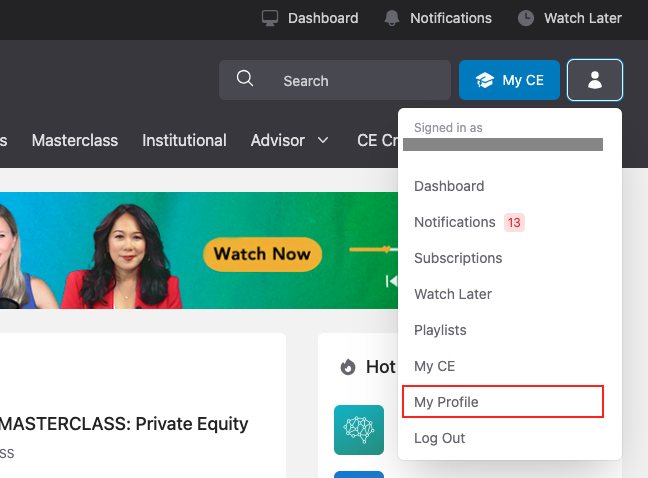
First, head to your profile page. You can get there by clicking on the user menu in the top right corner, then selecting "My Profile."
-
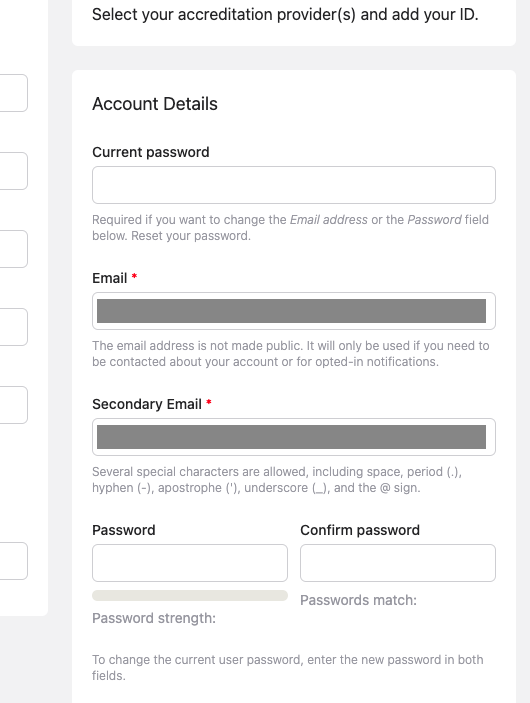
On your profile page, find the "Account Details" section (see screenshot below).
-
Enter your current password in the field labeled "Current password."
-
Next, type your new password into the "Password" field, and then type it again into the "Confirm Password" field.
-
Finally, scroll to the bottom of the page and click "Save."
That's it! Your password has been successfully updated.